
- การติดตั้ง WinSCP
- การหา Fingerprint
- การ Setup session
- Download Files
- Upload Files
- Create Directory
- List Directory
- Move ไฟล์ทั้งหมดใน srcDirectory ไป desDirectory
nuget WinSCP
Note: SFTP (FTP over SSH) and FTPS (FTP over SSL) (SFTP vs. FTPS: What’s the Best Protocol for Secure FTP?)
1.การติดตั้ง WinSCP
ติดตั้งเวอร์ชันล่าสุด
PM> Install-Package WinSCP
ติดตั้งแบบกำหนดเวอร์ชัน
PM> Install-Package WinSCP -Version 5.15.0
2.การหา Fingerprint
2.1 SFTP
ถ้าใช้ SFTP (FTP over SSH) ให้ connect ด้วย PuTTY จะเห็น Fingerprint
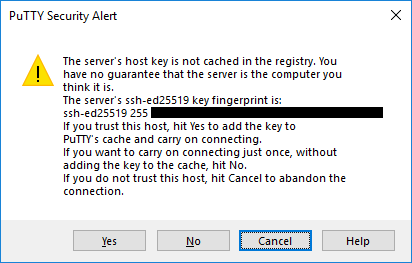
จะเห็น Fingerprint (ตำแหน่งที่ปิดสีดำ)
นำค่าที่ได้มากำหนดให้ SshHostKeyFingerprint = "ssh-ed25519 256 00:11:22:33:44:55:66:77:88:99:aa:bb:cc:dd:ee:ff"
ฐาน 16 ต้องเป็นตัวเล็ก (เหมือนกับที่เห็นในรูป) ถ้าเป็นตัวใหญ่จะไม่ได้
2.2 FTPS
ถ้าใช้ FTPS (FTP over SSL) ให้ connect ด้วย WinSCP จะเห็น Fingerprint (เฉพาะกรณีที่ TLS/SSL certificate is not signed by a trusted authority เช่น self signed certificate)
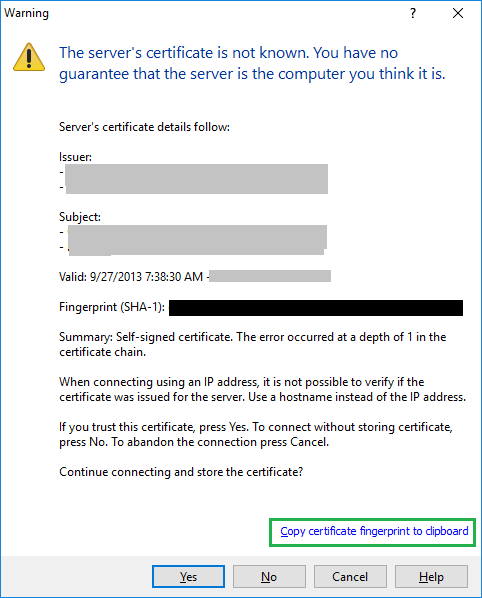
จะเห็น Fingerprint (ตำแหน่งที่ปิดสีดำ)
นำค่าที่ได้มากำหนดให้ TlsHostCertificateFingerprint = "00:11:22:33:44:55:66:77:88:99:aa:bb:cc:dd:ee:ff:01:23:45:67"
ทำการคลิกที่ copy certificate fingerprint to clipboard (ในกรอบสีเขียว) เพื่อ copy ค่า Fingerprint มาใช้ได้
3. การ Setup session
การหาค่า Setup ด้วย WinSCP
ทำการ connect ด้วย WinSCP ให้เรียบร้อย
เลือกเมนู Session > Generate Session URL/Code
เลือกแท็บ .NET assembly tab
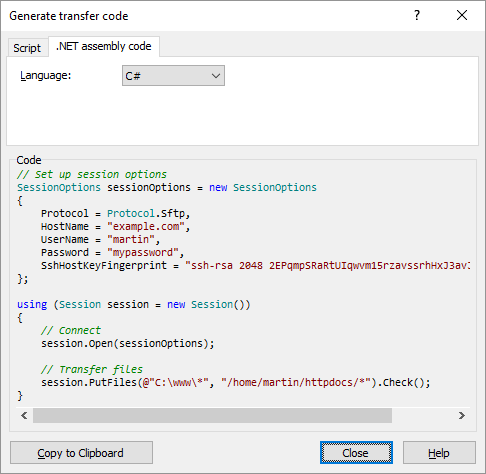
จะเห็นค่าที่ใช้ Setup ครบเลย (รวม Fingerprint)
3.1 SFTP
// Setup session options
SessionOptions sessionOptions = new SessionOptions
{
    Protocol = Protocol.Sftp,
    HostName = ConfigurationManager.AppSettings.Get("FTPServer"),
    UserName = ConfigurationManager.AppSettings.Get("FTPUserName"),
    Password = ConfigurationManager.AppSettings.Get("FTPPassword"),
    SshHostKeyFingerprint = "ssh-ed25519 256 00:11:22:33:44:55:66:77:88:99:aa:bb:cc:dd:ee:ff"
};
3.2 FTPS
// Setup session options
SessionOptions sessionOptions = new SessionOptions
{
    Protocol = Protocol.Ftp,
    HostName = ConfigurationManager.AppSettings.Get("FTPServer"),
    UserName = ConfigurationManager.AppSettings.Get("FTPUserName"),
    Password = ConfigurationManager.AppSettings.Get("FTPPassword"),
    FtpSecure = FtpSecure.Explicit,
    TlsHostCertificateFingerprint = "00:11:22:33:44:55:66:77:88:99:aa:bb:cc:dd:ee:ff:01:23:45:67",
};
4.Download Files
using System;
using System.Configuration;
using WinSCP;

namespace ConsoleApp1
{
    class Program
    {
        static void Main(string[] args)
        {
            //--- Download file from server
            string remoteFile = "";
            string localFile = "";

            if (DownloadSFTP(remoteFile, localFile))
            {
                Console.WriteLine(string.Format("  Download file '{0}' to local SUCCESS.",remoteFile));
            }

            //--- Upload file to server
            if (UploadSFTP(localFile, remoteFile))
            {
                Console.WriteLine(string.Format("  Upload file '{0}' to server SUCCESS.", remoteFile));
            }
        }

        private static bool DownloadSFTP(string remoteFile, string localFile)
        {
            try
            {
                // Setup session options
                SessionOptions sessionOptions = new SessionOptions
                {
                    Protocol = Protocol.Sftp,
                    HostName = ConfigurationManager.AppSettings.Get("FTPServer"),
                    UserName = ConfigurationManager.AppSettings.Get("FTPUserName"),
                    Password = ConfigurationManager.AppSettings.Get("FTPPassword"),
                    SshHostKeyFingerprint = "ssh-ed25519 256 00:11:22:33:44:55:66:77:88:99:aa:bb:cc:dd:ee:ff"
                };

                using (WinSCP.Session session = new WinSCP.Session())
                {
                    // Connect
                    session.Open(sessionOptions);

                    // Download files
                    TransferOptions transferOptions = new TransferOptions();
                    transferOptions.TransferMode = TransferMode.Binary;

                    TransferOperationResult transferResult;
                    transferResult = session.GetFiles(remoteFile, localFile, false, transferOptions);

                    // Throw on any error
                    transferResult.Check();

                    // Print results
                    foreach (TransferEventArgs transfer in transferResult.Transfers)
                    {
                        Console.WriteLine(string.Format("download '{0}' succeeded", transfer.FileName));
                    }
                }

                return true;
            }
            catch (Exception e)
            {
                Console.WriteLine(string.Format("Error: {0}", e.Message));
                return false;
            }
        }
    }
}
5.Upload Files
        private static bool UploadSFTP(string localFile, string remoteFile)
        {
            try
            {
                // Setup session options
                SessionOptions sessionOptions = new SessionOptions
                {
                    Protocol = Protocol.Sftp,
                    HostName = ConfigurationManager.AppSettings.Get("FTPServer"),
                    UserName = ConfigurationManager.AppSettings.Get("FTPUserName"),
                    Password = ConfigurationManager.AppSettings.Get("FTPPassword"),
                    SshHostKeyFingerprint = "ssh-ed25519 256 00:11:22:33:44:55:66:77:88:99:aa:bb:cc:dd:ee:ff"
                };

                using (WinSCP.Session session = new WinSCP.Session())
                {
                    // Connect
                    session.Open(sessionOptions);

                    // Upload files
                    TransferOptions transferOptions = new TransferOptions();
                    transferOptions.TransferMode = TransferMode.Binary;

                    TransferOperationResult transferResult;
                    transferResult = session.PutFiles(localFile, remoteFile, false, transferOptions);

                    // Throw on any error
                    transferResult.Check();

                    // Print results
                    foreach (TransferEventArgs transfer in transferResult.Transfers)
                    {
                        Console.WriteLine(string.Format("Upload '{0}' succeeded", transfer.FileName));
                    }
                }

                return true;
            }
            catch (Exception e)
            {
                Console.WriteLine(string.Format("Error: {0}", e.Message));
                return false;
            }
        }
6.Create Directory
ก่อนสร้าง directory ตรวจสอบก่อนว่ามี directory นี้แล้วหรือยังด้วย session.FileExists()
        public static bool CreateDirectory(string remoteFolder)
        {
            try
            {
                // Setup session options
                SessionOptions sessionOptions = new SessionOptions
                {
                    Protocol = Protocol.Sftp,
                    HostName = ConfigurationManager.AppSettings.Get("FTPServer"),
                    UserName = ConfigurationManager.AppSettings.Get("FTPUserName"),
                    Password = ConfigurationManager.AppSettings.Get("FTPPassword"),
                    SshHostKeyFingerprint = "ssh-ed25519 256 00:11:22:33:44:55:66:77:88:99:aa:bb:cc:dd:ee:ff"
                };

                using (WinSCP.Session session = new WinSCP.Session())
                {
                    // Connect
                    session.Open(sessionOptions);

                    if (!session.FileExists(remoteFolder))
                    {
                        session.CreateDirectory(remoteFolder);
                        log.Info(string.Format("CreateDirectory '{0}' succeeded", remoteFolder));
                    }
                    else
                    {
                        log.Info(string.Format("directory '{0}' already exist", remoteFolder));
                    }
                }

                return true;
            }
            catch (Exception e)
            {
                Program.log.Info(string.Format("Error: {0}", e.Message));
                return false;
            }
        }
7.List Directory
ดูรายชื่อไฟล์ใน Directory
public static bool ListDirectory(string remoteFolder)
{
    try
    {
        // Setup session options
        SessionOptions sessionOptions = new SessionOptions
        {
            Protocol = Protocol.Sftp,
            HostName = ConfigurationManager.AppSettings.Get("FTPServer"),
            UserName = ConfigurationManager.AppSettings.Get("FTPUserName"),
            Password = ConfigurationManager.AppSettings.Get("FTPPassword"),
            SshHostKeyFingerprint = "ssh-ed25519 256 00:11:22:33:44:55:66:77:88:99:aa:bb:cc:dd:ee:ff"
        };

        using (Session session = new Session())
        {
            // Connect
            session.Open(sessionOptions);

            RemoteDirectoryInfo directory =
                session.ListDirectory(remoteFolder);

            foreach (RemoteFileInfo fileInfo in directory.Files)
            {
                //log.Info(string.Format(
                //     "{0} with size {1}, permissions {2} and last modification at {3}",
                //     fileInfo.Name, fileInfo.Length, fileInfo.FilePermissions,
                //     fileInfo.LastWriteTime));
                if ((fileInfo.Name != ".") && (fileInfo.Name != ".."))
                {
                    log.Info(string.Format("'{0}'", fileInfo.Name));
                }

            }
        }
        return true;
    }
    catch (Exception e)
    {
        log.Info(string.Format("Error: {0}", e.Message));
        return false;
    }
}
8.Move ไฟล์ทั้งหมดใน srcDirectory ไป desDirectory
public static bool DoMoveFile(string sourceFolder, string desFolder)
{
    try
    {
        // Setup session options
        SessionOptions sessionOptions = new SessionOptions
        {
            Protocol = Protocol.Sftp,
            HostName = ConfigurationManager.AppSettings.Get("FTPServer"),
            UserName = ConfigurationManager.AppSettings.Get("FTPUserName"),
            Password = ConfigurationManager.AppSettings.Get("FTPPassword"),
            SshHostKeyFingerprint = "ssh-ed25519 256 00:11:22:33:44:55:66:77:88:99:aa:bb:cc:dd:ee:ff"
        };

        using (Session session = new Session())
        {
            // Connect
            session.Open(sessionOptions);

            RemoteDirectoryInfo directory =
                session.ListDirectory(sourceFolder);

            foreach (RemoteFileInfo fileInfo in directory.Files)
            {
                if ((fileInfo.Name != ".") && (fileInfo.Name != ".."))
                {
                    string sourceFile = string.Format("{0}/{1}", sourceFolder, fileInfo.Name);
                    //string sourceFile = fileInfo.Name;
                    string desFile = string.Format("{0}/{1}", desFolder, fileInfo.Name);
                    log.Info(string.Format("Move '{0}' to '{1}'", sourceFile, desFile));
                    session.MoveFile(sourceFile, desFile);
                }

            }
        }
        return true;
    }
    catch (Exception e)
    {
        log.Info(string.Format("Error: {0}", e.Message));
        return false;
    }
}
Link