
เมื่อสร้างโปรเจ็กส์แบบ WCF Service Application จะเป็นแบบ SOAP ถ้าจะให้เป็น REST ต้องมา config
- สร้างโปรเจ็กส์แบบ WCF
- ทดลองรัน
- ทำให้รองรับการเรียกแบบ GET
- ทำให้รองรับการเรียกแบบ POST
- คอนฟิกให้ใช้ https
1.สร้างโปรเจ็กส์แบบ WCF
สร้างโปรเจ็กส์แบบ WCF Service Application ชื่อ WcfService1
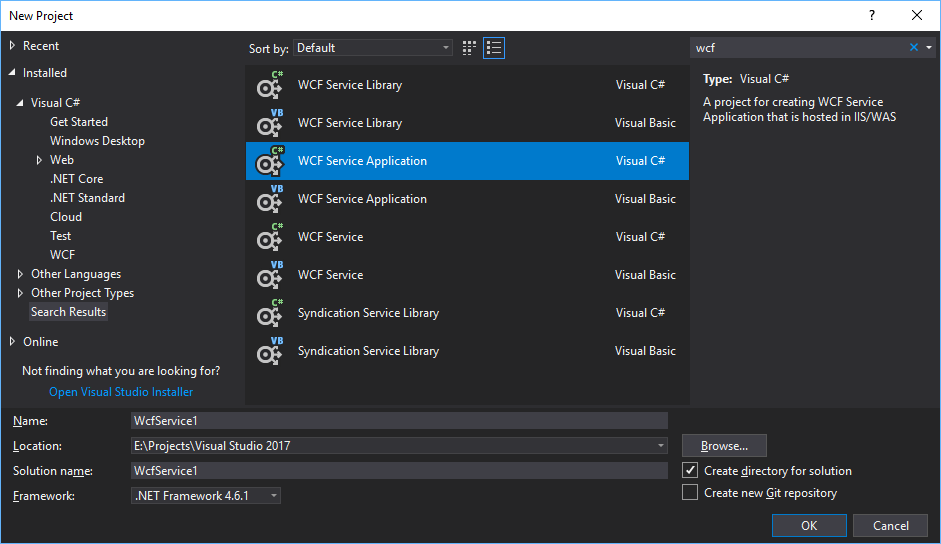
จะได้ไฟล์ IService1.cs
using System;
using System.Collections.Generic;
using System.Linq;
using System.Runtime.Serialization;
using System.ServiceModel;
using System.ServiceModel.Web;
using System.Text;

namespace WcfService1
{
    // NOTE: You can use the "Rename" command on the "Refactor" menu to change the interface name "IService1" in both code and config file together.
    [ServiceContract]
    public interface IService1
    {

        [OperationContract]
        string GetData(int value);

        [OperationContract]
        CompositeType GetDataUsingDataContract(CompositeType composite);

        // TODO: Add your service operations here
    }


    // Use a data contract as illustrated in the sample below to add composite types to service operations.
    [DataContract]
    public class CompositeType
    {
        bool boolValue = true;
        string stringValue = "Hello ";

        [DataMember]
        public bool BoolValue
        {
            get { return boolValue; }
            set { boolValue = value; }
        }

        [DataMember]
        public string StringValue
        {
            get { return stringValue; }
            set { stringValue = value; }
        }
    }
}
และได้ไฟล์ Service1.svc
using System;
using System.Collections.Generic;
using System.Linq;
using System.Runtime.Serialization;
using System.ServiceModel;
using System.ServiceModel.Web;
using System.Text;

namespace WcfService1
{
    // NOTE: You can use the "Rename" command on the "Refactor" menu to change the class name "Service1" in code, svc and config file together.
    // NOTE: In order to launch WCF Test Client for testing this service, please select Service1.svc or Service1.svc.cs at the Solution Explorer and start debugging.
    public class Service1 : IService1
    {
        public string GetData(int value)
        {
            return string.Format("You entered: {0}", value);
        }

        public CompositeType GetDataUsingDataContract(CompositeType composite)
        {
            if (composite == null)
            {
                throw new ArgumentNullException("composite");
            }
            if (composite.BoolValue)
            {
                composite.StringValue += "Suffix";
            }
            return composite;
        }
    }
}
เมธอด GetData นี้เดี๋ยวเราจะลองเรียกใช้แบบ GET
2.ทดลองรัน
รัน จะเห็น WCF Test Client เป็นอันใช้ได้
ดูว่า Service เรารันอยู่ที่ port ไหน ดูได้จากหน้านี้
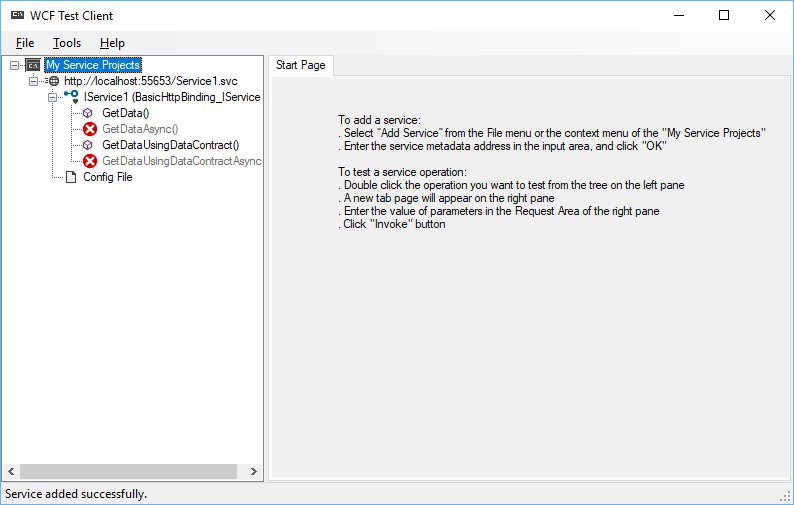
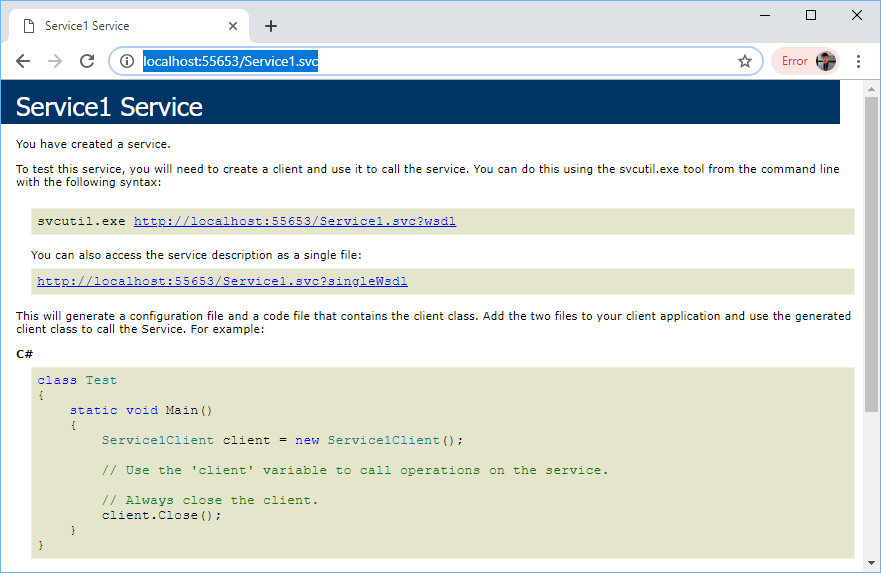
ทีนี้ลองเรียกไปที่ http://localhost:55653/Service1.svc จะเห็นแบบนี้
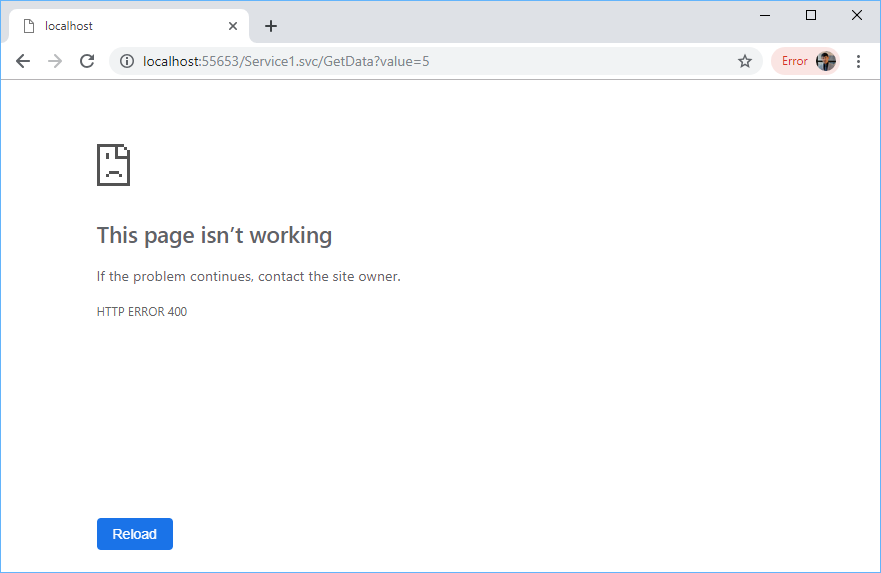
แต่พอลองเรียกแบบ GET ตามนี้ http://localhost:55653/Service1.svc/GetData?value=5 จะขึ้น Error แบบนี้
3.ทำให้รองรับการเรียกแบบ GET
ให้แก้ไขไฟล์ IService1.cs และไฟล์ Web.config
ไฟล์ IService1.cs เพิ่มบรรทัดที่ 6
[ServiceContract]
public interface IService1
{

    [OperationContract]
    [WebInvoke(Method = "GET", BodyStyle = WebMessageBodyStyle.Wrapped)]
    string GetData(int value);

    [OperationContract]
    CompositeType GetDataUsingDataContract(CompositeType composite);

    // TODO: Add your service operations here
}
ไฟล์ Web.config
<?xml version="1.0"?>
<configuration>

  <appSettings>
    <add key="aspnet:UseTaskFriendlySynchronizationContext" value="true" />
  </appSettings>
  <system.web>
    <compilation debug="true" targetFramework="4.6.1" />
    <httpRuntime targetFramework="4.6.1"/>
  </system.web>
  <system.serviceModel>
    <services>
      <service name="WcfService1.Service1" behaviorConfiguration="ServiceBehaviour">
        <endpoint address="" binding="webHttpBinding" contract="WcfService1.IService1" behaviorConfiguration="web"></endpoint>
      </service>
    </services>

    <behaviors>
      <serviceBehaviors>
        <behavior name="ServiceBehaviour">
          <!-- To avoid disclosing metadata information, set the values below to false before deployment -->
          <serviceMetadata httpGetEnabled="true" httpsGetEnabled="true"/>
          <!-- To receive exception details in faults for debugging purposes, set the value below to true.  Set to false before deployment to avoid disclosing exception information -->
          <serviceDebug includeExceptionDetailInFaults="false"/>
        </behavior>
      </serviceBehaviors>

      <endpointBehaviors>
        <behavior name="web">
          <webHttp automaticFormatSelectionEnabled="true" />
        </behavior>
      </endpointBehaviors>
    </behaviors>
    <protocolMapping>
      <add binding="basicHttpsBinding" scheme="https" />
    </protocolMapping>
    <serviceHostingEnvironment aspNetCompatibilityEnabled="true" multipleSiteBindingsEnabled="true" />
  </system.serviceModel>
  <system.webServer>
    <modules runAllManagedModulesForAllRequests="true"/>
    <!--
        To browse web app root directory during debugging, set the value below to true.
        Set to false before deployment to avoid disclosing web app folder information.
      -->
    <directoryBrowse enabled="true"/>
  </system.webServer>

</configuration>
บรรทัดที่ 13-14 ต้องใส่ชื่อ namespace ให้ถูกด้วย (ตัวอย่างนี้ namespace เป็น WcfService1)
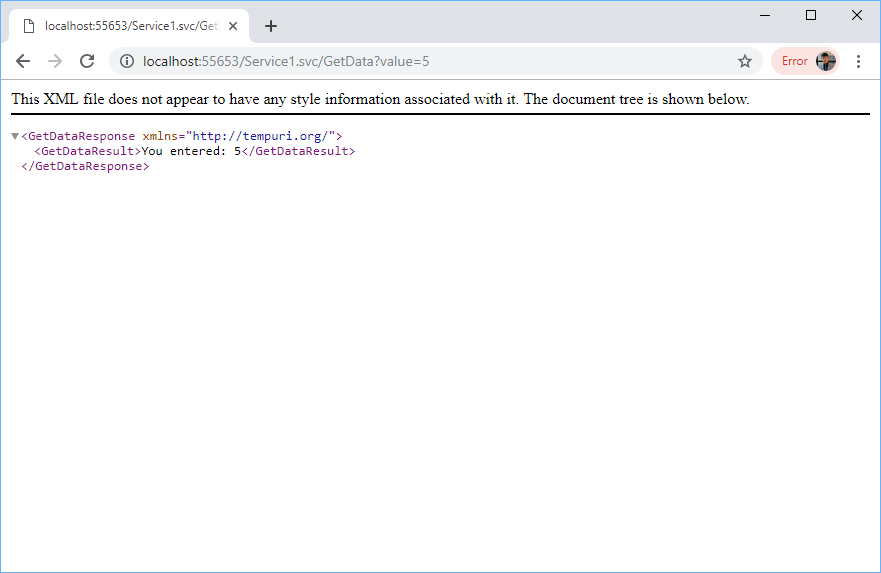
รันอีกทีจะเรียกแบบ GET ได้ละ
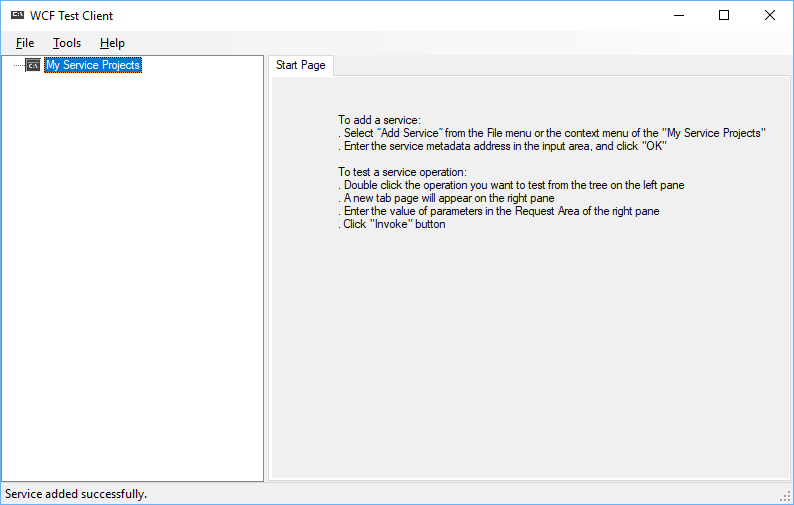
แต่ที่ WCF Test Client จะไม่ขึ้นละ แบบนี้
4.ทำให้รองรับการเรียกแบบ POST
แก้ไขไฟล์ IService1.cs และไฟล์ Service1.svc.cs
ไฟล์ IService1.cs
using System;
using System.Collections.Generic;
using System.Linq;
using System.Runtime.Serialization;
using System.ServiceModel;
using System.ServiceModel.Web;
using System.Text;

namespace WcfService1
{
    // NOTE: You can use the "Rename" command on the "Refactor" menu to change the interface name "IService1" in both code and config file together.
    [ServiceContract]
    public interface IService1
    {

        [OperationContract]
        [WebInvoke(Method = "GET", BodyStyle = WebMessageBodyStyle.Wrapped)]
        string GetData(int value);

        [OperationContract]
        CompositeType GetDataUsingDataContract(CompositeType composite);

        // TODO: Add your service operations here
        [OperationContract]
        [WebInvoke(Method = "POST",
                   RequestFormat = WebMessageFormat.Json,
                   ResponseFormat = WebMessageFormat.Json)]
        Student GetUpdatedStudent(Student std);

    }

    [DataContract]
    public class Student
    {
        [DataMember]
        public string RollNumber { get; set; }
        [DataMember]
        public string Name { get; set; }
    }

    // Use a data contract as illustrated in the sample below to add composite types to service operations.
    [DataContract]
    public class CompositeType
    {
        bool boolValue = true;
        string stringValue = "Hello ";

        [DataMember]
        public bool BoolValue
        {
            get { return boolValue; }
            set { boolValue = value; }
        }

        [DataMember]
        public string StringValue
        {
            get { return stringValue; }
            set { stringValue = value; }
        }
    }
}
ไฟล์ Service1.svc.cs
using System;
using System.Collections.Generic;
using System.Linq;
using System.Runtime.Serialization;
using System.ServiceModel;
using System.ServiceModel.Web;
using System.Text;

namespace WcfService1
{
    // NOTE: You can use the "Rename" command on the "Refactor" menu to change the class name "Service1" in code, svc and config file together.
    // NOTE: In order to launch WCF Test Client for testing this service, please select Service1.svc or Service1.svc.cs at the Solution Explorer and start debugging.
    public class Service1 : IService1
    {
        public string GetData(int value)
        {
            return string.Format("You entered: {0}", value);
        }

        public CompositeType GetDataUsingDataContract(CompositeType composite)
        {
            if (composite == null)
            {
                throw new ArgumentNullException("composite");
            }
            if (composite.BoolValue)
            {
                composite.StringValue += "Suffix";
            }
            return composite;
        }

        public Student GetUpdatedStudent(Student std)
        {
            std.Name = "I have Updated Student Name";
            return std;
        }
    }
}
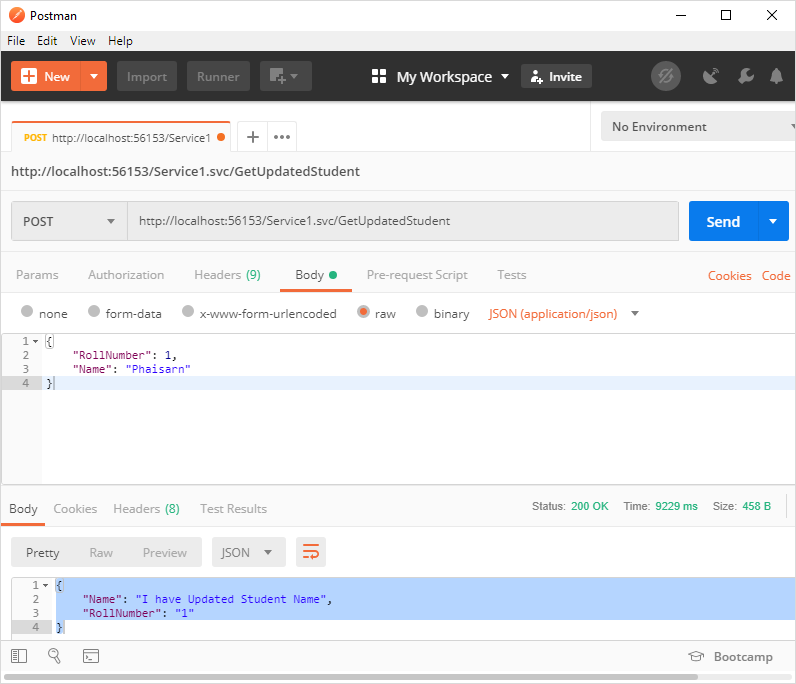
ตัวอย่างการส่งค่าไปให้ POST
{
    "RollNumber": 1,
    "Name": "Phaisarn"
}
ค่าที่ได้กลับมา
{
    "Name": "I have Updated Student Name",
    "RollNumber": "1"
}
Link
5.คอนฟิกให้ใช้ https
ไฟล์ Web.config
<?xml version="1.0"?>
<configuration>

  <appSettings>
    <add key="aspnet:UseTaskFriendlySynchronizationContext" value="true" />
  </appSettings>
  <system.web>
    <compilation debug="true" targetFramework="4.5" />
    <httpRuntime targetFramework="4.5"/>
  </system.web>
  <system.serviceModel>
    <services>
      <service name="WcfService1.Service1" behaviorConfiguration="ServiceBehaviour">
        <endpoint address="" binding="webHttpBinding" contract="WcfService1.IService1"
                  bindingConfiguration="sslBinding"
                  behaviorConfiguration="web"></endpoint>
        <endpoint address="mex" binding="mexHttpsBinding" contract="IMetadataExchange" />

      </service>
    </services>

    <behaviors>
      <serviceBehaviors>
        <behavior name="ServiceBehaviour">
          <!-- To avoid disclosing metadata information, set the values below to false before deployment -->
          <serviceMetadata httpGetEnabled="true" httpsGetEnabled="true"/>
          <!-- To receive exception details in faults for debugging purposes, set the value below to true.  Set to false before deployment to avoid disclosing exception information -->
          <serviceDebug includeExceptionDetailInFaults="false"/>
        </behavior>
      </serviceBehaviors>

      <endpointBehaviors>
        <behavior name="web">
          <webHttp automaticFormatSelectionEnabled="true" />
        </behavior>
      </endpointBehaviors>
    </behaviors>

    <bindings>
      <webHttpBinding>
        <binding name="sslBinding" crossDomainScriptAccessEnabled="true">
          <security mode="Transport">
          </security>
        </binding>
      </webHttpBinding>
    </bindings>

    <protocolMapping>
      <add binding="basicHttpsBinding" scheme="https" />
    </protocolMapping>
    <serviceHostingEnvironment aspNetCompatibilityEnabled="true" multipleSiteBindingsEnabled="true" />
  </system.serviceModel>
  <system.webServer>
    <modules runAllManagedModulesForAllRequests="true"/>
    <!--
        To browse web app root directory during debugging, set the value below to true.
        Set to false before deployment to avoid disclosing web app folder information.
      -->
    <directoryBrowse enabled="true"/>
  </system.webServer>

</configuration>