
Pelican is a static site generator that requires no database or server-side logic.
- Installation
- Create a project
- Create an article
- Generate your site
- Preview your site
- Themes
1. Installation
Install Pelican and Markdown.
python -m pip install "pelican[markdown]"
อัพเกรดด้วยคำสั่ง
python -m pip install --upgrade pelican
2. Create a project
Create a folder for your site and create a skeleton project inside of it.
mkdir -p ~/projects/yoursite
cd ~/projects/yoursite
pelican-quickstart
สามารถกำหนด path ได้ด้วย
pelican-quickstart --path /your/desired/directory
3. Create an article
Create your first article with the following content in ~/projects/yoursite/content/keyboard-review.md:
Title: My First Review
Date: 2010-12-03 10:20
Category: Review

Following is a review of my favorite mechanical keyboard.
4. Generate your site
From your project root directory, run the pelican command to generate your site:
pelican content
Your site has now been generated inside the output/ directory. (You may see a warning related to feeds, but that is normal when developing locally and can be ignored for now.)
5. Preview your site
pelican -r -l
Preview your site by navigating to http://localhost:8000/ in your browser.
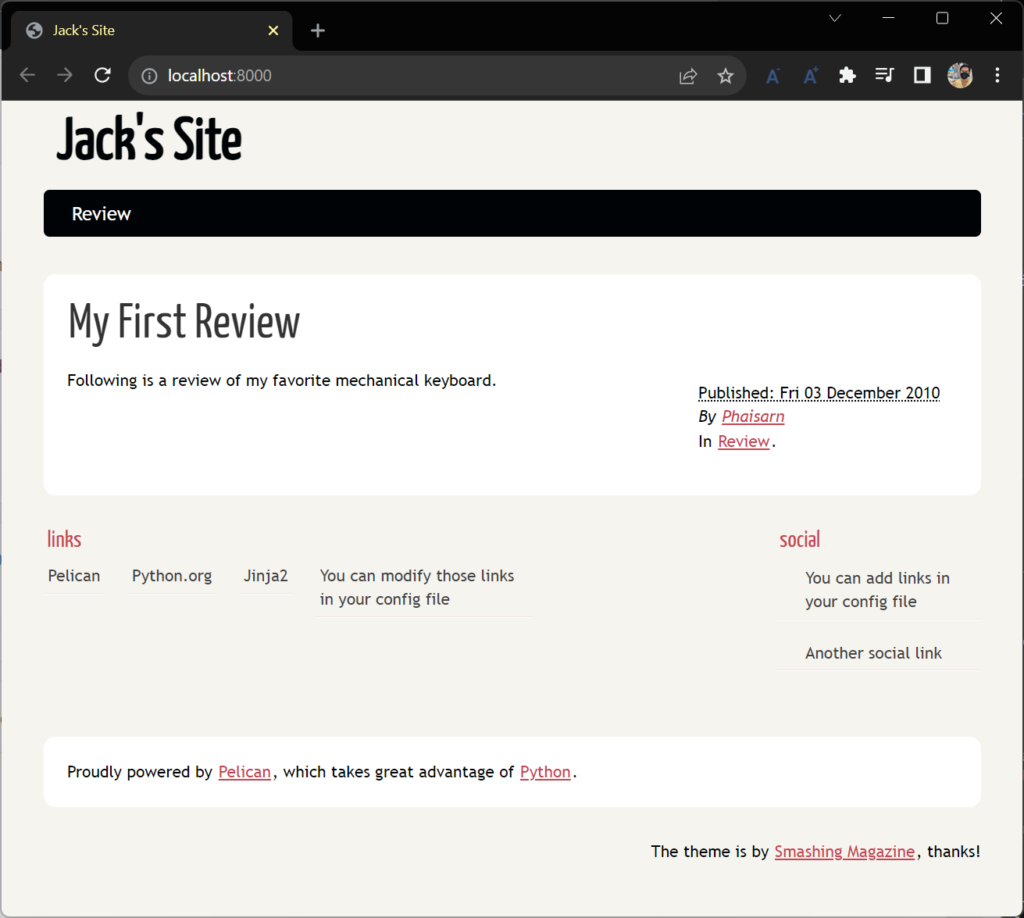
เปลี่ยนให้รัน port 8081
pelican -r -l -p 8001
- -r คือ Relaunch pelican each time a modification occurs on the content files.
- -l คือ Serve content files via HTTP and port 8000.
- -p คือ Port to serve HTTP files at.
6. Themes
ดาว์นโหลด theme จาก github.com/getpelican/pelican-themes
กำหนด theme ที่ใช้ ที่ไฟล์ pelicanconf.py และเพิ่มค่าค่า THEME
THEME = "/home/user/pelican-themes/theme-name"
คำสั่ง pelican
Help
> pelican -h
usage: pelican [-h] [-t THEME] [-o OUTPUT] [-s SETTINGS] [-d] [-v] [-q] [-D] [--version] [-r] [--print-settings [SETTING_NAME ...]] [--relative-urls] [--cache-path CACHE_PATH] [--ignore-cache]
               [-w SELECTED_PATHS] [--fatal errors|warnings] [--logs-dedup-min-level {DEBUG,INFO,WARNING,ERROR}] [-l] [-p PORT] [-b BIND] [-e [OVERRIDES ...]]
               [path]

A tool to generate a static blog, with restructured text input files.

positional arguments:
  path                  Path where to find the content files. (default: None)

optional arguments:
  -h, --help            show this help message and exit
  -t THEME, --theme-path THEME
                        Path where to find the theme templates. If not specified, it will use the default one included with pelican. (default: None)
  -o OUTPUT, --output OUTPUT
                        Where to output the generated files. If not specified, a directory will be created, named "output" in the current path. (default: None)
  -s SETTINGS, --settings SETTINGS
                        The settings of the application, this is automatically set to pelicanconf.py if a file exists with this name. (default: None)
  -d, --delete-output-directory
                        Delete the output directory. (default: None)
  -v, --verbose         Show all messages. (default: None)
  -q, --quiet           Show only critical errors. (default: None)
  -D, --debug           Show all messages, including debug messages. (default: None)
  --version             Print the pelican version and exit.
  -r, --autoreload      Relaunch pelican each time a modification occurs on the content files. (default: False)
  --print-settings [SETTING_NAME ...]
                        Print current configuration settings and exit. Append one or more setting name arguments to see the values for specific settings only. (default: None)
  --relative-urls       Use relative urls in output, useful for site development (default: False)
  --cache-path CACHE_PATH
                        Directory in which to store cache files. If not specified, defaults to "cache". (default: None)
  --ignore-cache        Ignore content cache from previous runs by not loading cache files. (default: False)
  -w SELECTED_PATHS, --write-selected SELECTED_PATHS
                        Comma separated list of selected paths to write (default: None)
  --fatal errors|warnings
                        Exit the program with non-zero status if any errors/warnings encountered. (default: )
  --logs-dedup-min-level {DEBUG,INFO,WARNING,ERROR}
                        Only enable log de-duplication for levels equal to or above the specified value (default: WARNING)
  -l, --listen          Serve content files via HTTP and port 8000. (default: False)
  -p PORT, --port PORT  Port to serve HTTP files at. (default: 8000) (default: None)
  -b BIND, --bind BIND  IP to bind to when serving files via HTTP (default: 127.0.0.1) (default: None)
  -e [OVERRIDES ...], --extra-settings [OVERRIDES ...]
                        Specify one or more SETTING=VALUE pairs to override settings. VALUE must be in JSON notation: specify string values as SETTING='"some string"'; booleans as SETTING=true or SETTING=false;
                        None as SETTING=null. (default: {})
Version
> pelican --version
4.8.0